
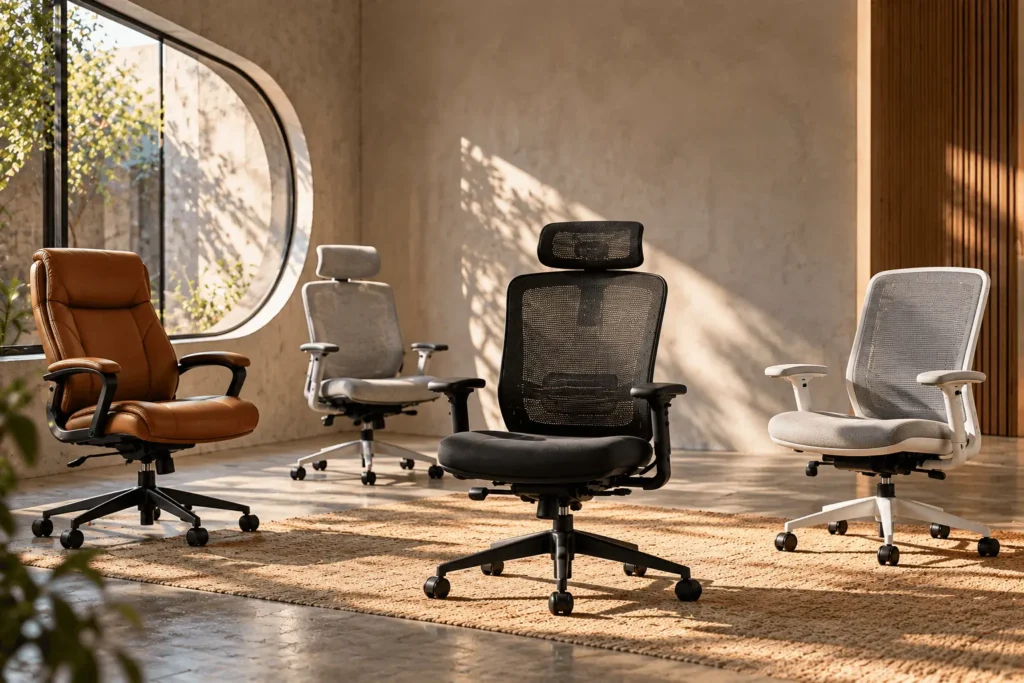
If you spend most of your workday at a desk, choosing among the best office chairs is less about finding one universally perfect model and more about finding the right combination of fit, support and adjustability for your body and workspace. A chair can have excellent materials and dozens of adjustments yet still feel wrong if the seat is too deep, the minimum height is too high or the armrests do not work with your desk.
This guide starts with the fundamentals rather than a simple list of expensive chairs. It focuses on specifications, fit questions and buyer-focused research that you can verify before purchasing. The goal is to help you narrow the field before specific Product Commerce recommendations and verified retailer offers are added.
Quick answer: for most home-office buyers, prioritize a chair with a suitable seat-height range, an appropriately sized seat pan, useful lumbar support, adjustable armrests and a recline or tilt mechanism you can actually use. If two chairs appear similar, choose the one that gives you more control over the dimensions that matter for your body rather than simply choosing the one with more features.
What makes an office chair a good choice?
A useful office chair should help you establish a comfortable working position without forcing your body to adapt to the chair. OSHA notes that a well-designed and appropriately adjusted chair should support the back, legs, buttocks and arms while reducing awkward postures and contact stress. OSHA also highlights the importance of adjustability because different users and sitting positions require different settings.
For a buyer, ask: Can the seat get low or high enough for your body and desk? Is the seat depth appropriate? Can the backrest and lumbar support meet your lower back? Can the armrests support your forearms without lifting your shoulders? Can you recline or change position without losing useful back support? Does the chair fit under your desk and within the space available? Are the capacity, warranty and return terms suitable?
OSHA: Computer Workstations — Chairs
1. Start with seat height, not the feature count
Seat height is one of the easiest specifications to overlook because shoppers often focus on lumbar systems, headrests or armrest technology first. In practice, the height range determines whether you can establish a stable position at your desk.
When seated, you generally want your feet supported rather than dangling while your knees and hips remain in a workable relationship with the seat. OSHA recommends a height-adjustable seat and describes an appropriate height as one where the entire sole of the foot can rest on the floor, with the back of the knee slightly higher than the seat. If your desk is fixed at a height that forces the chair upward, a footrest may help provide stable foot support.
Do not compare chairs using only the advertised maximum height. Check the minimum seat height too. It matters particularly for shorter users and for desks where the work surface cannot be lowered.
2. Seat depth can make or break the fit
Seat depth is the distance from the backrest area toward the front edge of the seat. It affects how easily you can sit back against the backrest while keeping the front edge from pressing into the area behind your knees.
A deeper seat may be useful for some taller users because it can provide more thigh support. But a seat that is too deep can be a problem for a shorter user: you may have to move forward to reach the backrest, which reduces the support you were trying to get from the chair.
An adjustable office chair with seat-depth adjustment can be valuable when multiple people will use the same chair or when you are unsure which fixed depth will fit you. OSHA likewise recommends depth adjustment so taller users can receive sufficient thigh support while shorter users can sit with their backs supported without the seat front contacting their knees.
OSHA: Computer Workstations — Purchasing Guide
3. Look for lumbar support that you can actually position
Lumbar support is often described as though the presence of a lumbar mechanism automatically makes a chair ergonomic. It does not. The important question is whether the support can meet the lower-back area comfortably in your normal sitting position.
OSHA recommends a backrest that follows the natural curvature of the spine and notes that adjustable lumbar support can be positioned to fit the lower back. When comparing an ergonomic office chair, check whether the lumbar system is fixed, height adjustable, depth adjustable, tension adjustable or integrated into a flexible backrest. More adjustment is not automatically better, but an adjustment that solves a real fit problem is useful.
4. Armrests should support your work, not interfere with it
Armrests are especially important if you spend hours typing, using a mouse or switching between devices. The goal is to let your shoulders relax while your forearms can be supported when appropriate.
Useful armrest adjustments may include height, width, depth and angle or pivot. Which ones matter most depends on how you work. Also check whether the armrests can move out of the way when you need to pull the chair close to the desk. OSHA recommends adjustable armrests that support the forearms without interfering with positioning under the work surface.
5. Recline matters because you should not stay frozen in one posture
A chair should not force you to maintain one perfectly upright position for the entire day. OSHA’s workstation guidance recommends changing working position frequently and making small adjustments to the chair or backrest rather than remaining still for prolonged periods.
That makes recline and tilt useful when they are controllable and comfortable. Look for information about recline range, tilt tension, lock positions and whether the backrest moves with you.
OSHA: Computer Workstations — Good Working Positions
6. Mesh, foam and upholstery each solve different problems
Material should be considered in the context of your environment rather than treated as a ranking by itself.
Mesh backs and seats can provide airflow and may appeal to people who work in warm rooms. Foam seats can offer a more cushioned feel. Fabric or other upholstered surfaces can provide a softer or more traditional feel. The right choice depends on your preferences, room temperature, cleaning needs and budget.
Do not choose a chair solely because a product page calls its material “premium” or “ergonomic.” Compare the actual construction, dimensions, adjustment range, warranty and return policy.
7. Match the chair to your body type
For shorter users
Start by checking minimum seat height and seat depth. A chair that cannot get low enough may leave your feet unsupported, while a deep seat may push the front edge behind your knees before your back reaches the backrest. Adjustable lumbar position and armrest height can also become more important as you fine-tune the fit.
For taller users
Check the maximum seat height, seat depth, backrest dimensions and stated capacity. A shallow seat may not provide enough thigh support. A chair with adjustable seat depth can be particularly useful when fixed dimensions do not work.
For larger users
Do not rely on a generic “big and tall” label. Check the actual seat width, usable seat area, weight capacity and dimensions. If the manufacturer publishes multiple configurations, verify which capacity and dimensions apply to the exact version you intend to purchase.
8. Match the chair to your desk and room
A chair does not exist in isolation. Desk height, keyboard position, monitor height and available floor space all affect whether the chair works.
Before buying, measure the clearance under your desk. Armrests that are comfortable but too tall to slide under the desk can become an everyday annoyance. Also measure the space behind and beside the chair if the chair has a large recline range.
For a compact workspace, the best office chair for home office use may be the chair that fits without sacrificing the adjustments you actually need. A smaller footprint can be more valuable than an accessory you rarely use.
9. Think about warranty and returns before you buy
Office chairs are difficult to evaluate from a product page alone. Even when specifications look excellent, individual comfort remains personal. That makes the seller’s return policy and the manufacturer’s warranty unusually important.
Compare the warranty length, what parts are covered, whether labor or shipping is included, and any exclusions. Then check the return window and whether return shipping or restocking costs apply.
10. How to compare the best office chairs without getting distracted by features
When a product page lists many adjustments, it is easy to assume the chair with the longest list must be the best. A better approach is to translate every feature into a specific buying question.
- Seat height: Does the range work with your feet and desk?
- Seat depth: Does it support your thighs without blocking your knees?
- Lumbar: Can the support meet your lower back?
- Armrests: Can they support your arms without raising your shoulders or blocking the desk?
- Recline: Can you change position comfortably?
- Materials: Will mesh, foam or upholstery suit your room and preferences?
- Capacity: Does the stated rating cover the exact configuration you are buying?
- Warranty: Does the coverage justify the intended ownership period?
- Returns: What happens if the chair does not fit?
This turns an office chair buying guide into a decision process rather than a feature checklist. It also makes it easier to compare different price levels without assuming that the more expensive model is automatically better for you.
What about premium office chairs?
Premium models can justify their prices through construction quality, broader adjustment ranges, refined mechanisms, distinctive materials or longer warranties. The important question is whether the additional cost buys an adjustment, material, warranty or fit characteristic that solves a problem you actually have.
What about budget office chairs?
Budget buyers should focus heavily on dimensions and useful adjustments. A lower price can be attractive, but a chair that does not fit your body can become expensive if you replace it soon after buying it.
Look for transparent dimensions, a stated weight capacity, meaningful seat-height adjustment, reasonable back support, usable armrests and a clear warranty or return policy. Avoid paying extra for decorative features when the basic seat and back dimensions do not suit you.
How ChoiceKite will evaluate future chair recommendations
ChoiceKite will prioritize published specifications, fit analysis, buyer-focused research and verified retailer information. Product recommendations will be connected to canonical Product Commerce records rather than invented product data.
Prices, availability, images, retailer offers and available configurations can change after an article is written. We will therefore keep the editorial reasoning separate from product-commerce data so the article can explain why a chair fits a particular buyer while the product card handles current product information and available purchase options.
ChoiceKite will not present personal product experience, ratings or results as its own unless that work is actually performed and documented by ChoiceKite.
A simple office-chair buying checklist
Before you click Buy, write down these measurements and requirements:
- Your approximate seated height and body proportions.
- Your desk height and the space available under it.
- Your preferred seat height and whether your feet can stay supported.
- The seat depth that lets you reach the backrest without knee pressure.
- The lumbar position that feels appropriate for you.
- The armrest range you need for keyboard and mouse work.
- Whether you prefer mesh, foam or upholstered surfaces.
- The chair’s stated capacity and dimensions.
- The warranty and return policy.
- Your real budget, including possible delivery or return costs.
Bottom line
The best office chairs are not defined by one universal feature, price or brand. The strongest choice is the chair whose dimensions and adjustments line up with your body, desk and working habits.
Start with seat height and seat depth. Then check lumbar support, armrests and recline. After that, compare materials, capacity, warranty, return terms and total cost. If a chair looks impressive but its basic dimensions do not fit you, the extra features will not fix the underlying problem.
As ChoiceKite’s office-chair library grows, this guide can connect those fit principles to specific canonical products and verified retailer offers. Until then, the most useful thing you can do is compare the numbers that determine fit rather than buying a chair because a product page simply calls it ergonomic.
Sources
- OSHA: Computer Workstations — Chairs
- OSHA: Computer Workstations — Evaluation Checklist
- OSHA: Computer Workstations — Good Working Positions
We may earn a small commission if you purchase through our links, at no extra cost to you.